

Know where your bus is. Wake up before your stop.
ನಿಮ್ಮ ಬಸ್ ಎಲ್ಲಿದೆ ನೋಡಿ, ನಿಮ್ಮ ನಿಲ್ದಾಣಕ್ಕೆ ಮುನ್ನ ಅಲಾರಂ ಪಡೆಯಿರಿ.
Live KSRTC, KKRTC and NWKRTC bus tracking, timetables for 262 bus stands, and an alarm that rings before your drop-off: “Your bus will reach Haveri in 10 minutes”. Free, no sign-up.
Android 7.0 or newer · direct download from askbengaluru.com · the Google Play link will appear here when the app is published
Track My BusnowTrack My Bus1 h agoTrack My Bus3 h agoApp will be published soon
Track My Bus is in testing on Google Play and will be published there soon. You don't have to wait: the same app is available now as a direct APK download from this page, free.
Everything for a bus journey in Karnataka, in one free app.
Alarm for your stop
Pick where you get off on any bus. The app rings before the bus gets there and again when it arrives, even with the app closed and the phone locked.
Bus notifications
“Your bus will reach Haveri in 10 minutes”, “Your bus arrived in Davanagere”: a note at every stop on the way, so you know where you are at night.
Live bus tracking
See where a KSRTC, KKRTC or NWKRTC bus is right now, from riders on board who share their position. LIVE, RECENT and PREDICTED, with the time of the last fix.
Every bus stand timetable
Departures from 240+ bus stands with bus type, via towns and arrival estimates. Search from any town to any town, including buses passing through.
Add a bus
A bus missing from the timetable? Add it with its time, route and via towns. Riders' additions show at the stand and in From → To searches.
Share your ride
Tap “I am on this bus” and people waiting ahead see it coming. Anonymous: no name or phone number is stored.
Namma Metro and BMTC
Metro lines, stations and fares, and BMTC routes with their stops, in the same app.
English and Kannada
Town and stop names in Kannada script alongside English, the way they are written on the bus boards.
An alarm for your stop, on every bus.
Sleep on the night bus without worrying about missing your stop. Set it once, put the phone away.
- 1Open your bus
Search From → To or open your bus stand, and tap the bus you are on.
- 2Tap Alarm, pick your drop-off
The stops after yours are listed with the expected time at each. Pick where you get off.
- 3Choose when to be woken
5, 10, 15, 20 or 30 minutes before. Switch on “Tell me at every stop” for a note at each town on the way.
- 4Ride
The alarm rings with the phone locked. When riders on board share the bus, the times follow its live position.
Track My BusnowTrack My Bus10 min laterTimes are estimates from the timetable and, when riders share the bus, its live position. Keep an eye on the road too.
A look inside the app
Search, live status, stand departures and BMTC routes. Swipe for more.
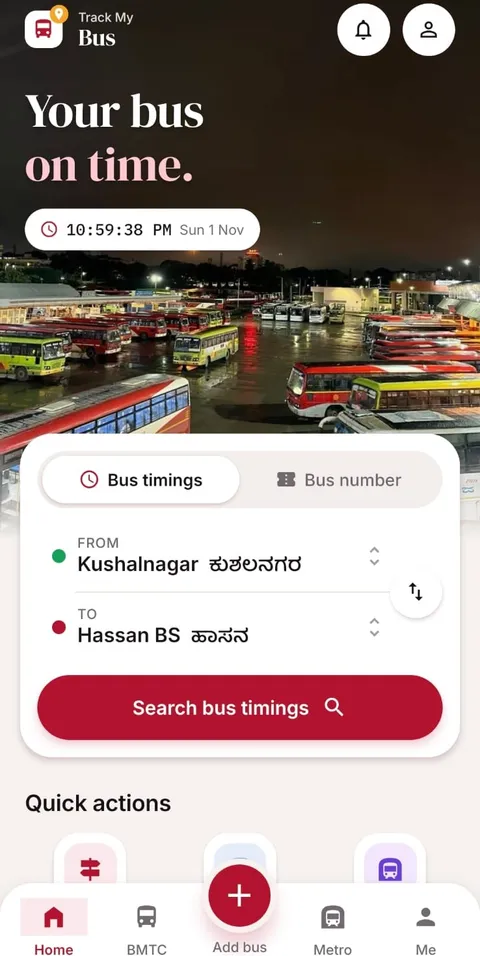
Home: search buses from any town to any town
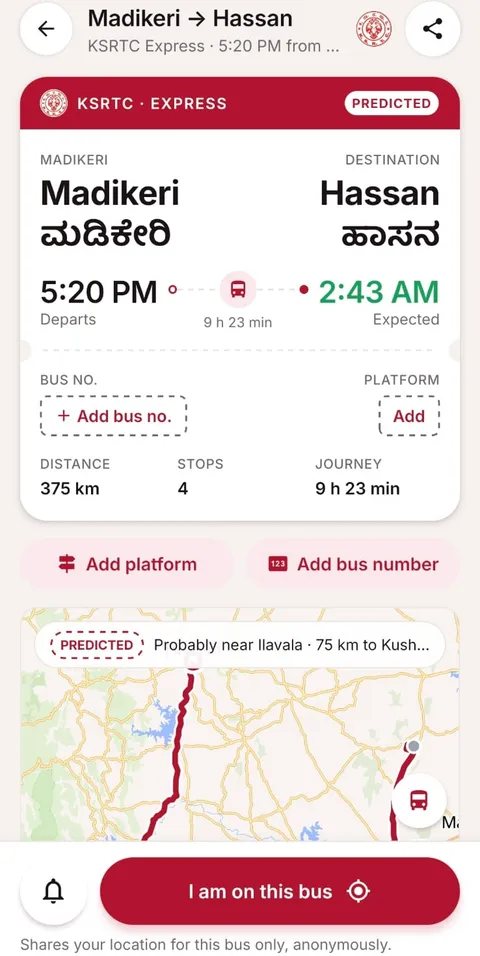
A bus: live position, stops passed and next stop
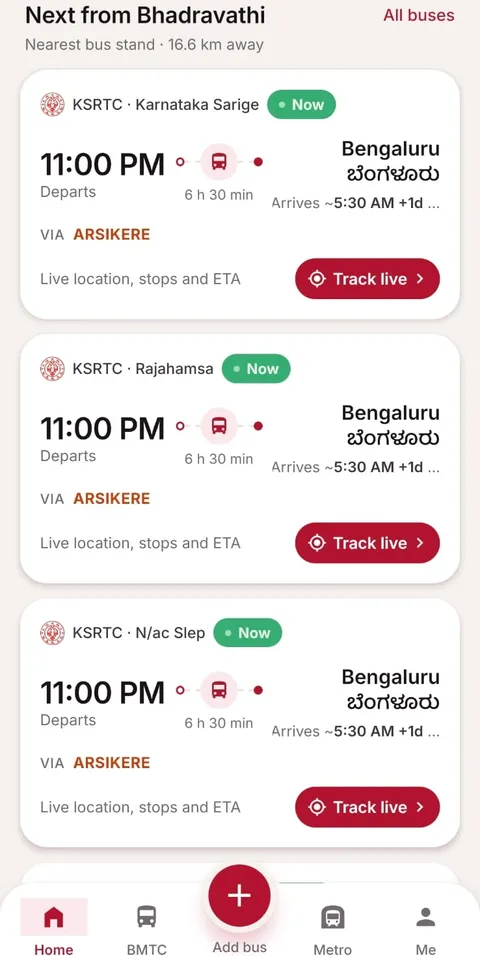
Next buses from your stand, with live status
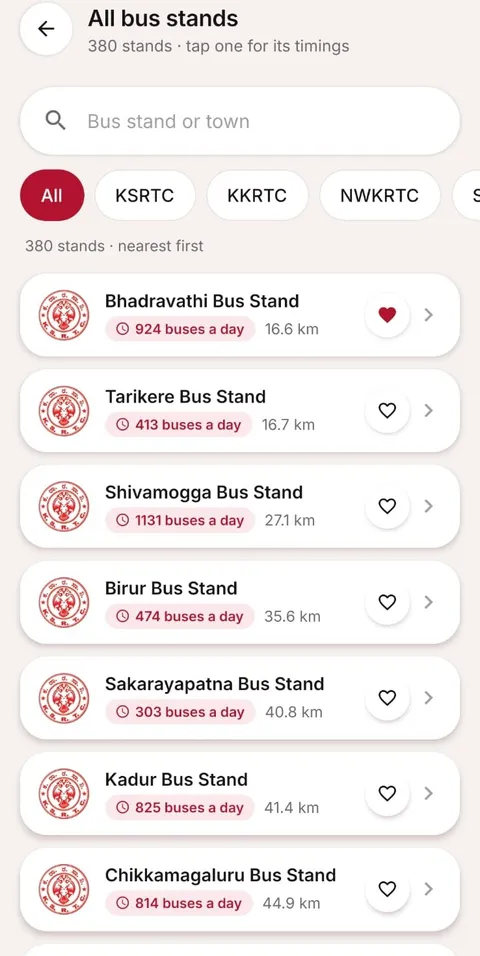
240+ KSRTC, KKRTC and NWKRTC bus stands
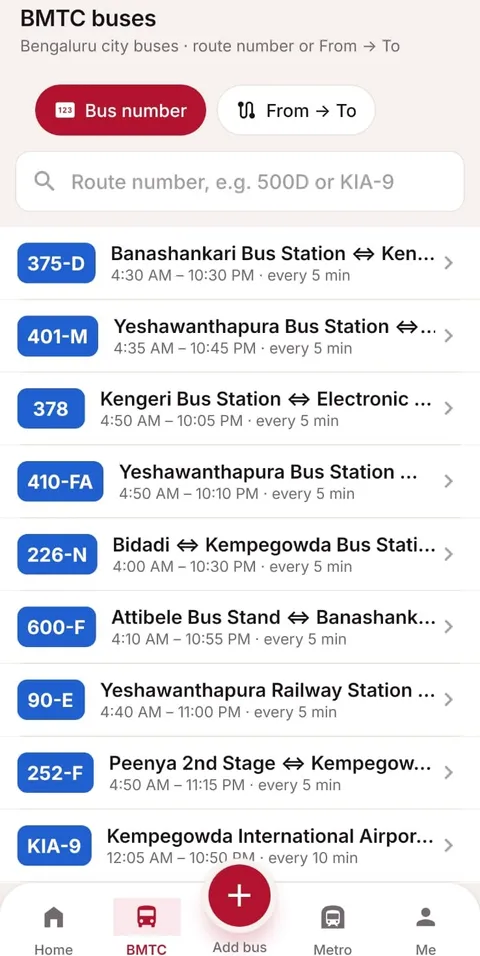
BMTC routes in Bengaluru
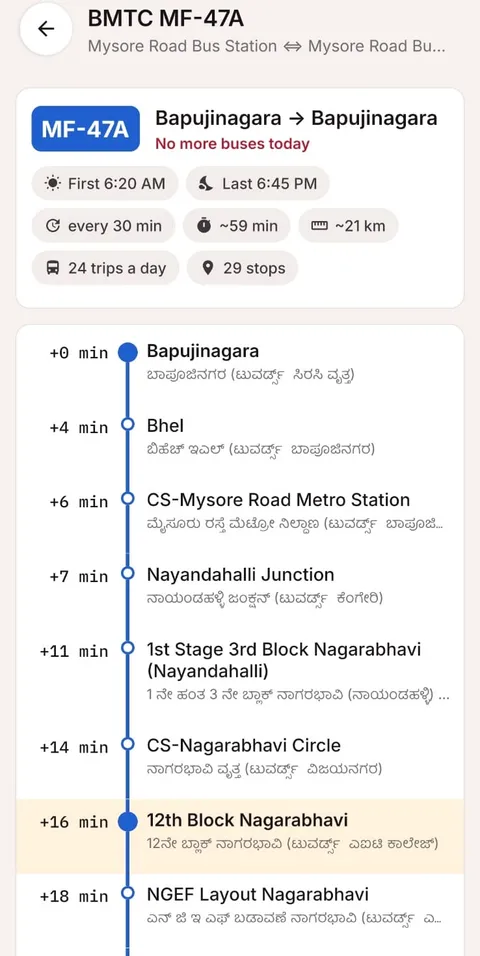
A BMTC route, stop by stop
Install the APK in a minute
While the Google Play listing is on its way, install the app straight from this site.
1 · Download
Tap Download the APK on your Android phone. The file comes from askbengaluru.com.
2 · Allow the install
Open the download. If Android asks, allow your browser to install apps (Settings › Install unknown apps).
3 · Open Track My Bus
Tap Install, then Open. Allow notifications so your bus alarms can ring.
Track My Bus app: questions
When will Track My Bus be on Google Play?
The app will be published on Google Play soon: it is in Google's testing and review now. Until then you can install it from this page as an APK, free and without sign-up. The Play Store link will be added here as soon as the listing is live.
How does the bus alarm work?
Open any bus, tap Alarm and pick the stop where you get off. Choose how early you want to be woken (5, 10, 15, 20 or 30 minutes) and whether you also want a note at every stop on the way. The app schedules the notifications on your phone, so they ring with the app closed and the screen locked, on the phone's alarm sound.
Are the alarm times exact?
They start from the timetable estimate for each stop. Whenever the bus is being tracked by riders on board, the times move with its live position: the app re-times the alarm when the bus runs early or late. The same message (“Your bus will reach Haveri in 10 minutes”) shows at the top of the bus's card in the app.
Is the app free? Do I need an account?
Yes, it is free, and you do not need an account to search buses, track them or set alarms. Sharing your position on a bus is optional and anonymous.
Which buses does it cover?
KSRTC, KKRTC (Kalyana Karnataka) and NWKRTC (North Western Karnataka): 262 bus stands and 73,665 scheduled departures a day, plus buses added by riders, Kerala RTC and Tamil Nadu services from Karnataka stands, BMTC routes and Namma Metro.
How do I install the APK?
Tap Download the APK on your Android phone. When the download finishes, open it; if Android asks, allow your browser to install apps (Settings › Install unknown apps), then tap Install. The app needs Android 7.0 or newer.
Is there an iPhone app?
Not yet. On an iPhone you can use the website: Ask Bengaluru has the same timetables, live bus map and From → To search in the browser.
Prefer the browser? See KSRTC bus timings and all bus stands. Ask Bengaluru is not affiliated with KSRTC, KKRTC, NWKRTC or BMTC.
Get Track My Bus
Free for Android. App will be published soon on Google Play; download the APK today.